XRoar on a PC or Mac
The simplest way to play: one data file and a launcher.
- Needs
- XRoar
- Disk swaps
- None
SHA-256 98786432f7f8e29fd768d1e72d079812c313a63ccebb7e51dd4de7295559801d
The full game, translated for a 1986 8-bit machine it was never written for. Pick the build that matches your hardware or emulator.
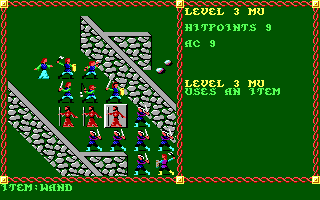
Pool of Radiance never came out for the CoCo. No Gold Box game ever reached a 6809 machine. This port is not a remake and not an emulator: it is the original game's logic, translated line for line from the decompiled source, running on a computer from 1986.
Every build was played through 16 recorded test sessions, covering character creation, shopping, camping, combat and saving, and matched the PC original screen for screen.
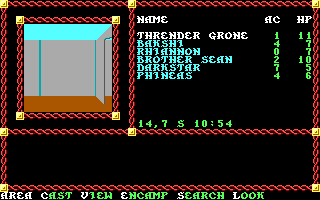
Pick the one that matches what you have. Each zip has its own README with the steps. These are version 1.2.0, from November 16, 2026. What changed.
The simplest way to play: one data file and a launcher.
SHA-256 98786432f7f8e29fd768d1e72d079812c313a63ccebb7e51dd4de7295559801d
One data file and a launcher for the coco3 machine.
SHA-256 7b07e591ba7fee6ee9382619ca8705701fa38bd5ffb85dd64032a257818f803a
One file for the SD card interface.
SHA-256 cc1969d19dc41730a588d24c07c8c83af61a80768967f38d813103eb5c5a52d4
A card image and the tool that writes it to CompactFlash.
SHA-256 1a2b8e57ed52763756ebf9d6e61f310eb64341163f992bdb0b49750344a9dd18
For XRoar with four drives, or real 80 track drives.
SHA-256 3cf9100beb4720bb6545a613572008e4589f03ef9fcdf19a7e3d000289e90d10
The standard RS-DOS disk. Works in emulators and with DriveWire too.
SHA-256 de01dfff3be45e21f6161ec9e60d22d0f5f158519946a74573b39e68915466a0
coco3.rom, and disk11.rom for the floppy builds). It is Tandy's and is not included.Install XRoar, put coco3.rom in its ROM folder, unzip the XRoar build and run:
xroar -m coco3 -ram-init clear -tv-input rgb -cart ide -load-hd0 POOLIDE.IMG -run POOL.BINOn a Mac you can double-click Play.command instead. Saved games live in the image file, so keep a copy if you want to start over.
The game plays the same, with three small changes: there is no code wheel, the credits name the port, and the prompts say BASIC where the PC said DOS.
Reports from real hardware are very welcome, on GitHub. Please say which version you played: it is on the credits screen.
These builds contain the game's art, maps and text, which belong to their owners. They are offered for a platform the game never shipped on. There is no PC build here because the PC game is still on sale, and that is the version to buy. If you hold the rights and want this page taken down, open an issue on GitHub and it will come down.
What changed in each version, newest first. The first number goes up when an update means starting over or new hardware, the second when something is added or changed, the third for fixes.
ide_card.py pull copies a saved game off the card into a PC game's SAVE folder, so you can carry on playing on a PC or a Tandy 1000. The card is only read. A different saved game in the same slot of the folder is replaced only when you ask for it (--replace-slot), and its old files are kept in a backup folder.ide_card.py can put saved games from a PC game's SAVE folder into a card that already holds the game (--add-slot), keeping the card's own saved games. A slot already in use is replaced only when you ask for it (--replace-slot), and a new listing shows what is in the card's save area.V1.1.0).The builds of this version still show `V1.0` on the credits screen.
The first release: the whole game on a CoCo 3 with 512 KB, played through 16 recorded test sessions (character creation, shopping, camping, combat and saving) that match the PC original screen for screen.
ide_card.py updates a card that holds an earlier build and keeps its saved games.